

Description
Customize Web Text with Precision
Overview
A+ FontSize Changer is a Chrome Extension designed to give users granular control over text display on any webpage. Unlike Chrome’s default zoom functionality, which scales the entire page, this tool adjusts the font size of individual elements without altering layout or causing content to scroll beyond the screen’s edge. This makes it particularly useful for users who need to enhance readability without disrupting the visual structure of a page.
The extension is ideal for individuals with visual impairments, long reading sessions, or those seeking a more comfortable browsing experience. It supports dynamic content loaded via AJAX and works within iframes, addressing common limitations found in similar tools. The developer, A+ Extensions, has focused on usability and reliability, with ongoing updates to fix bugs and improve compatibility across platforms.
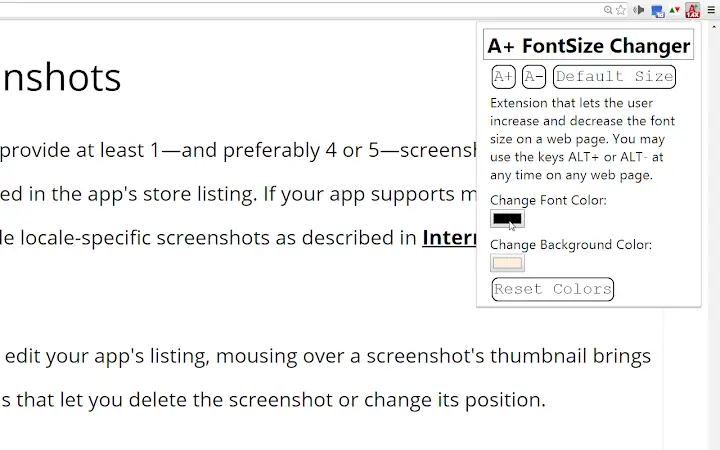
Real-world applications include reading lengthy articles, navigating complex web forms, or customizing content for better accessibility. Users can adjust text size incrementally using keyboard shortcuts or the popup menu. The tool also allows customization of text and background colors, enabling users to create personalized viewing modes, including a non-inverting night mode that preserves image and video clarity.
Key Features & Capabilities
- Element-Level Font Size Adjustment – Changes the font size of individual page elements instead of zooming the entire page, preserving layout integrity and preventing horizontal scrolling.
- Keyboard Shortcuts – Offers ALT+ and ALT- for quick font size changes, with alternative use of ALT+Up Arrow and ALT+Down Arrow. Customization is possible via Chrome’s extension shortcuts page.
- Text and Background Color Customization – Enables users to change text color and background color independently, supporting accessibility needs and personal preference.
- Non-Inverting Night Mode – Allows users to create custom dark themes without distorting images or videos, ensuring media remains fully viewable.
- Dynamic Content & iFrame Support – Functions on pages with AJAX-loaded content and within iframes, with guidance on interaction for optimal results.
- Scroll Position Preservation – Maintains the user’s current scroll position after font size adjustments on most pages.
- Line-Height Adjustment – Automatically adjusts line height when font size changes to prevent text crowding.
- Link Underline Option – Provides a toggle to underline links when colors are changed, improving visibility on text-heavy backgrounds.
These features collectively support a more personalized and accessible browsing experience. For example, a user reading a research paper can increase text size without disrupting the document’s layout, while simultaneously applying a high-contrast color scheme for better focus.
User Interface, Workflow & Performance
The extension features a minimal popup interface with clearly labeled buttons for adjusting font size and color settings. Navigation is straightforward, with intuitive controls that require no prior technical knowledge. The user workflow is streamlined: open the popup, select a size increment, and apply changes with a single click or keyboard shortcut.
Performance is consistent with typical Chrome extensions, operating efficiently without noticeable lag during use. The developer did not specify resource usage details, but the extension’s lightweight nature—1.2 MB in size—suggests low system impact. Stability is maintained across sessions, with no reported crashes or memory leaks in available data.
Workflow efficiency is enhanced by keyboard shortcuts and automatic scroll position retention. Users can make rapid adjustments without interrupting their reading or navigation. The interface remains responsive even on complex pages with dynamic content.
Compatibility & System Requirements
A+ FontSize Changer is compatible with Windows, Mac, and Linux operating systems, ensuring broad accessibility across desktop environments. It functions exclusively within the Google Chrome browser, as it is built as a Chrome Extension.
The extension has a file size of 1.2 MB, indicating a lightweight installation. The developer did not provide additional system requirements. Compatibility with specific Chrome versions is not specified, though the extension has been updated to support current Chrome behavior, including changes to the new tab page and extension interaction.
Exact system requirements were not listed. Users should ensure their Chrome browser is up to date for optimal performance. The extension works on standard desktop hardware without requiring special configurations.
Pros and Cons
Pros
- Adjusts font size at the element level, preserving layout and avoiding zoom-related scrolling
- Supports dynamic content and iframes, a key advantage over many similar tools
- Offers customizable text and background colors, including non-inverting night mode
- Keyboard shortcuts enable fast, hands-free adjustments
- Preserves scroll position after font changes for uninterrupted reading
- Lightweight at 1.2 MB, with minimal impact on browser performance
Cons
- Lite version does not save custom settings across page reloads
- Does not allow font family changes in the Lite edition
- Requires user interaction in iframes to apply changes (first click before shortcut use)
- Color picker behavior may vary slightly across operating systems
- Not available outside the Chrome browser ecosystem
FAQ Section
Is A+ FontSize Changer compatible with all websites?
The extension works on most websites, including those with dynamic content and iframes. However, it does not function on special Chrome pages like chrome://newtab or the Chrome Web Store.
Can I use this extension offline?
Yes, once installed, the extension operates without an internet connection. It modifies the current page’s display using client-side JavaScript.
Does this extension save my custom settings?
The Lite version does not save text size, color, or background preferences when navigating away from a page. The Pro edition may offer persistent settings, though details were not provided.
Is the extension safe to use?
As a Chrome Extension developed by A+ Extensions and available through the Chrome Web Store, it operates within Chrome’s security sandbox. It does not collect user data or track browsing behavior.
Can I change the keyboard shortcuts?
Yes, users can customize the shortcut keys via Chrome’s extension shortcuts page at chrome://extensions/shortcuts.
Final Thoughts
A+ FontSize Changer delivers a focused, reliable solution for users seeking precise control over web text. Its ability to adjust font size without zooming, support for dynamic content, and advanced customization options make it a standout tool in the accessibility space. While the Lite version has limitations in persistence and font family options, its core functionality remains powerful and practical.
It is especially beneficial for professionals, students, and individuals with visual needs who spend significant time reading online. The clean interface, efficient workflow, and strong compatibility across platforms reinforce its value.
For anyone looking to enhance readability and comfort while browsing, this extension offers a simple yet effective upgrade to the standard web experience.
Download A+ FontSize Changer now
Guides & Tutorials for A+ FontSize Changer Lite Extension for Chrome
How to install A+ FontSize Changer Lite Extension for Chrome
- Click the Preview / Download button above.
- Once redirected, accept the terms and click Install.
- Wait for the A+ FontSize Changer Lite Extension for Chrome download to finish on your device.
How to use A+ FontSize Changer Lite Extension for Chrome
This software is primarily used for its core features described above. Open the app after installation to explore its capabilities.
User Reviews for A+ FontSize Changer Lite Extension for Chrome 0
No reviews found





